Convert CHM to PDF Online

Transform your Compiled HTML Help files into accessible PDFs instantly. Free, secure, and no software required.

SSL Encrypted Files Deleted in 2 Hours No Registration Required Completely Free

CHM to PDF Converter

Upload your Compiled HTML Help file and convert it to PDF in seconds

Drop your CHM file here or click to upload
Max file size: 2MB • Supports .chm files • No signup required
Converting your help file...

Please wait while we process your file

Pro Tip: Perfect for converting legacy help documentation, software manuals, and archived help files

What is a CHM file?

CHM (Compiled HTML Help) is a file format used by Microsoft's HTML-based help systems. These files contain compressed HTML pages, images, JavaScript, and CSS files, all bundled into a single help document.
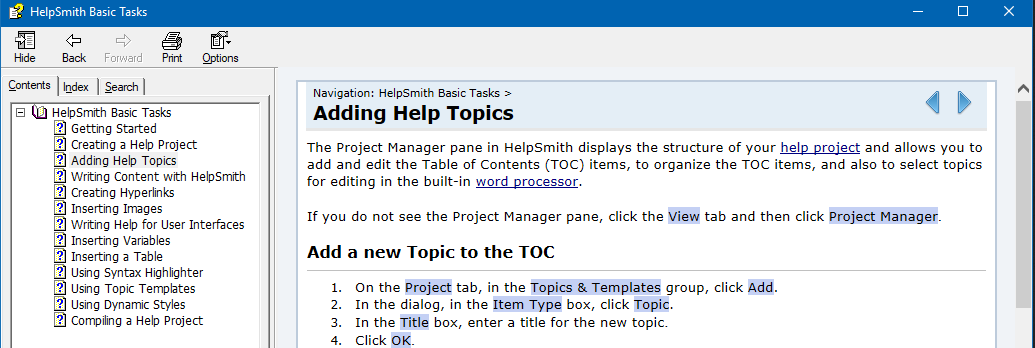
Example CHM file interface showing typical help documentation layout

Remember these classic help files? CHM was the standard for software documentation.

CHM files typically contain:
  • Compressed HTML pages
  • Embedded images and media
  • JavaScript and CSS files
  • Navigation structure and index
Common uses:
  • Software documentation
  • Technical manuals
  • Help systems
  • Offline documentation
Why CHM is outdated:

CHM is considered an outdated format due to security restrictions in modern browsers and operating systems. Many systems now block CHM files or require specialized viewers, making PDF conversion essential for accessibility.

How to Convert CHM to PDF

Transform your help files into accessible PDFs in just three simple steps

1

Upload Your File

Drag and drop your .chm file or click to select it from your computer. Works with help files from any software or documentation system.

2

Convert Instantly

Click "Convert to PDF" and our secure servers will extract and format all content, preserving the original layout and structure.

3

Download PDF

Get your accessible PDF ready for sharing, printing, or archiving. Perfect formatting maintained for all content and images.

Why Convert CHM to PDF?

Modern solutions for legacy help files

CHM Compatibility Issues
  • Blocked by modern security systems
  • Requires specialized CHM viewers
  • Not supported on mobile devices
  • Limited to Windows environments
PDF Advantages
  • Universal compatibility
  • Easy sharing with colleagues
  • Works on all devices
  • Built-in security features

Why Choose Rare2PDF?

The most reliable online CHM to PDF converter

Secure & Private

256-bit SSL encryption protects your files during transfer. All uploads are automatically deleted within 2 hours for maximum privacy.

Lightning Fast

Convert your CHM files to PDF in seconds. Our optimized servers ensure quick processing without compromising quality.

Completely Free

No hidden fees, subscriptions, or signup required. Professional-quality PDF conversion at absolutely no cost to you.

Perfect Formatting

Preserves original layout, images, and content structure. Maintains readability and professional appearance in PDF format.

Works Everywhere

Compatible with any device and browser. Convert files on desktop, tablet, or mobile with our responsive design.

No Software Needed

Works entirely in your browser without requiring CHM viewers or any software installation on your computer.

Common Use Cases

Software Documentation

Convert legacy software help files to PDF:

  • Archive old software manuals
  • Share documentation with non-Windows users
  • Make help files accessible on modern systems
  • Create portable documentation libraries

Perfect for IT departments managing legacy software documentation.

Business & Training

Convert business help files for modern use:

  • Update training materials to PDF format
  • Share procedural documentation
  • Archive company knowledge bases
  • Create mobile-friendly manuals

Essential for businesses transitioning from legacy help systems.

Frequently Asked Questions

Everything you need to know about converting CHM files to PDF

CHM (Compiled HTML Help) files are Microsoft's help file format containing compressed HTML pages. Modern systems often block CHM files due to security restrictions, and they require specialized viewers to open. Converting to PDF solves these compatibility issues and makes the content universally accessible.

Simply upload your CHM file to our converter, click "Convert to PDF," and download the resulting PDF file. The conversion process extracts all content from the CHM file and formats it into a readable PDF document.

Yes, our converter preserves the content structure, formatting, and images from your CHM file. While the interactive navigation is converted to a linear PDF format, all content remains intact and readable.

Absolutely! We use 256-bit SSL encryption for all file transfers and automatically delete your files within 2 hours. Your CHM files and resulting PDFs are processed securely and never stored permanently.

Our converter supports CHM files up to 2MB in size, which covers most help documentation files. If your file is larger, consider extracting specific sections or contact us for assistance with larger files.

Yes! Our online CHM to PDF converter works on any operating system including Mac, Linux, and Windows. Since it's web-based, you only need a browser to convert your files, regardless of your platform.

About Rare2PDF

Solving legacy file format challenges for modern users.

Rare2PDF is built by a team that understands the frustration of dealing with outdated file formats. We've seen countless users struggle with CHM files that won't open on modern systems, and we built this tool to bridge the gap between legacy documentation and modern accessibility.

Our CHM to PDF converter is specifically designed to handle the complexities of Microsoft's help file format, ensuring that valuable documentation isn't lost to changing technology standards.

15,000+

CHM Files Converted

95%

User Satisfaction

100%

Free Service

Preserving Digital Heritage

Join thousands of users who trust Rare2PDF to convert their legacy help files into accessible, modern formats.